Travel Planner
Plan trips with locations, stays, transport, day-by-day itineraries, and a planning checklist.
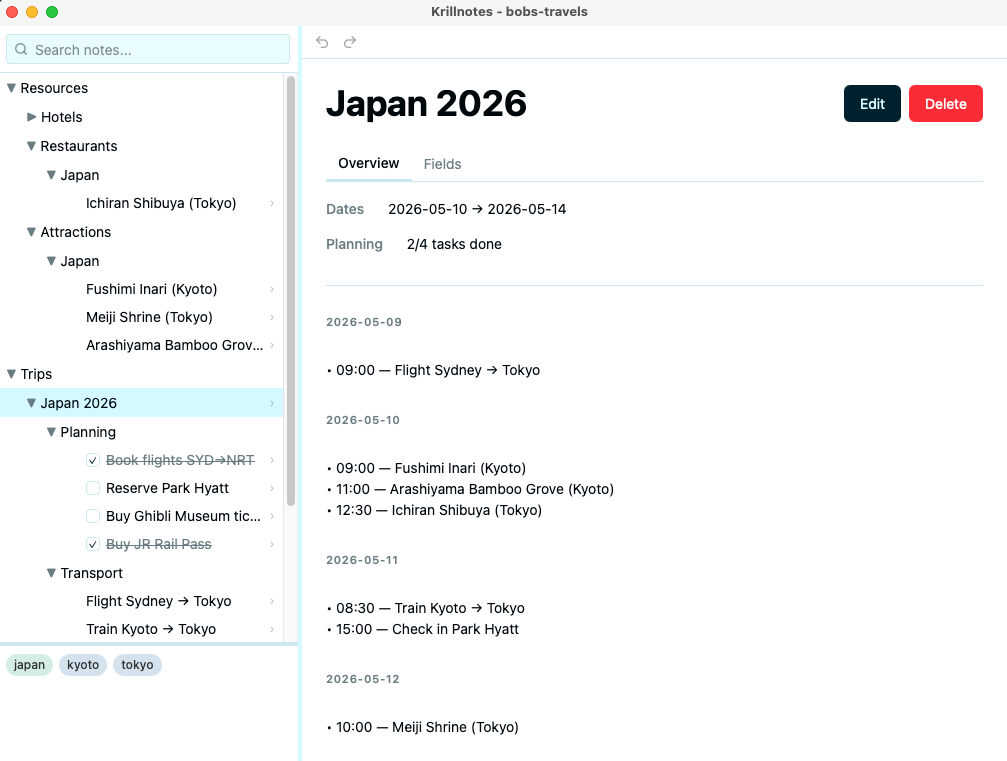
A comprehensive travel planning template with eight interconnected schemas. Build a location library of hotels, restaurants, and attractions, then create trips with day-by-day itineraries that link activities to your saved locations. Track hotel bookings, transport legs, and planning tasks with checkboxes.
Downloads
- travel_planner.rhai — import into Script Manager
- travel_planner.krillnotes — sample workspace
How to use
- Import
travel_planner.rhaiin Settings → Scripts → Import Script - Create a Folder note called “Resources” with sub-folders for Hotels, Restaurants, Attractions, etc.
- Add Location notes inside each sub-folder to build your location library
- Create a Trip note with start and end dates
- Add DayPlan children to the Trip — one per day, each titled by its date
- Add Activity notes inside each DayPlan and link them to Locations
- Add Stay notes for hotel bookings, linking to a Location
- Add Transport notes for flights, trains, or other travel legs
- Add Task notes for planning items like visa applications or packing lists
How it works
Schemas overview
| Schema | Purpose |
|---|---|
| Folder | Generic container for organising the tree |
| Location | A place — hotel, restaurant, attraction, etc. with city, category, rating, and photo |
| Stay | A hotel booking linked to a Location, with check-in/out dates and price |
| Transport | A travel leg (flight, train, bus, etc.) with departure/arrival details |
| Trip | Top-level trip container with start/end dates |
| DayPlan | A single day in a trip, auto-titled by its date |
| Activity | An item on a day, links to a Location, Transport, or Stay |
| Task | A planning checklist item with checkbox, due date, and category |
Auto-titled notes
Several schemas derive their title automatically on save:
- Location →
"Name (City)" - Stay →
"Hotel Name (check-in – check-out)" - Transport →
"Flight Sydney → Tokyo"(using type + cities) - DayPlan → the date field value
- Activity →
"09:00 — Restaurant Name"(resolves linked note names)
Trip overview view
The Trip overview shows the date range, planning task progress (e.g. “3/5 tasks done”), and a day-by-day summary listing each DayPlan’s activities as bullet points, sorted by time.
Note linking
Activities use note_link fields to connect to Locations, Transport, or Stay
notes. The linked note’s name is resolved and displayed in the activity title
and in the DayPlan timeline view. This keeps your itinerary readable without
duplicating information.
Sort actions
Two context-menu sort actions keep your tree organised:
- Sort by Time on DayPlan — orders activities chronologically
- Sort by Date on Trip — orders DayPlans by date
Schema
schema("Trip", #{
    version: 1,
    allowed_children_schemas: ["DayPlan", "Stay", "Transport", "Folder"],
    fields: [
        #{ name: "start_date", type: "date",     required: false },
        #{ name: "end_date",   type: "date",     required: false },
        #{ name: "notes",      type: "textarea", required: false },
    ],
});

schema("DayPlan", #{
    version: 1,
    title_can_edit: false,
    allowed_children_schemas: ["Activity"],
    fields: [
        #{ name: "date",  type: "date",     required: true  },
        #{ name: "notes", type: "textarea", required: false },
    ],
    on_save: |note| {
        let d = note.fields["date"] ?? ();
        let title = if type_of(d) == "string" && d != "" { d }
                    else { "Unscheduled Day" };
        set_title(note.id, title);
        commit();
    }
});

schema("Location", #{
    version: 1,
    title_can_edit: false,
    is_leaf: true,
    fields: [
        #{ name: "name",     type: "text",     required: true                          },
        #{ name: "city",     type: "text",     required: true                          },
        #{ name: "country",  type: "text",     required: true                          },
        #{ name: "category", type: "select",   required: true,
           options: ["Hotel", "Restaurant", "Attraction", "Museum", "Temple",
                     "Park", "Market", "Bar", "Cafe", "Beach", "Other"]                },
        #{ name: "address",  type: "text",     required: false                         },
        #{ name: "rating",   type: "rating",   required: false, max: 5                 },
        #{ name: "notes",    type: "textarea", required: false                         },
        #{ name: "photo",    type: "file",     required: false,
           allowed_types: ["image/jpeg", "image/png", "image/webp"]                    },
    ],
    on_save: |note| {
        let name = note.fields["name"] ?? "";
        let city = note.fields["city"] ?? "";
        let title = if city != "" { name + " (" + city + ")" } else { name };
        if title == "" { title = "Untitled Location"; }
        set_title(note.id, title);
        commit();
    }
});

schema("Task", #{
    version: 1,
    show_checkbox: true,
    is_leaf: true,
    fields: [
        #{ name: "due_date",  type: "date",      required: false            },
        #{ name: "category",  type: "select",    required: false,
           options: ["Booking", "Visa", "Insurance", "Packing", "Other"]    },
        #{ name: "cost",      type: "number",    required: false            },
        #{ name: "currency",  type: "select",    required: false,
           options: ["USD", "EUR", "GBP", "JPY", "AUD", "Other"]           },
        #{ name: "notes",     type: "textarea",  required: false            },
    ],
});