Zettelkasten
An atomic note-taking system. Notes auto-title with today's date and related notes surface via shared tags.
A Zettelkasten (German for slip-box) is a method for building knowledge through small, atomic notes linked by shared ideas. This template brings that method to Krillnotes: each Zettel note auto-titles itself with today’s date and the first few words of its content. Add native tags and the Zettel view shows you which other notes share those tags.
Downloads
- zettelkasten.rhai — import into Script Manager
- zettelkasten.krillnotes — sample workspace
How to use
- Import
zettelkasten.rhaiin Settings → Scripts → Import Script - Create a new note and choose Kasten as the type — this is your slip-box
- Add children and choose Zettel as the type for each
- Write your idea in the body field and save — the title is set automatically
- Add native tags to each Zettel (tag cloud panel or the InfoPanel)
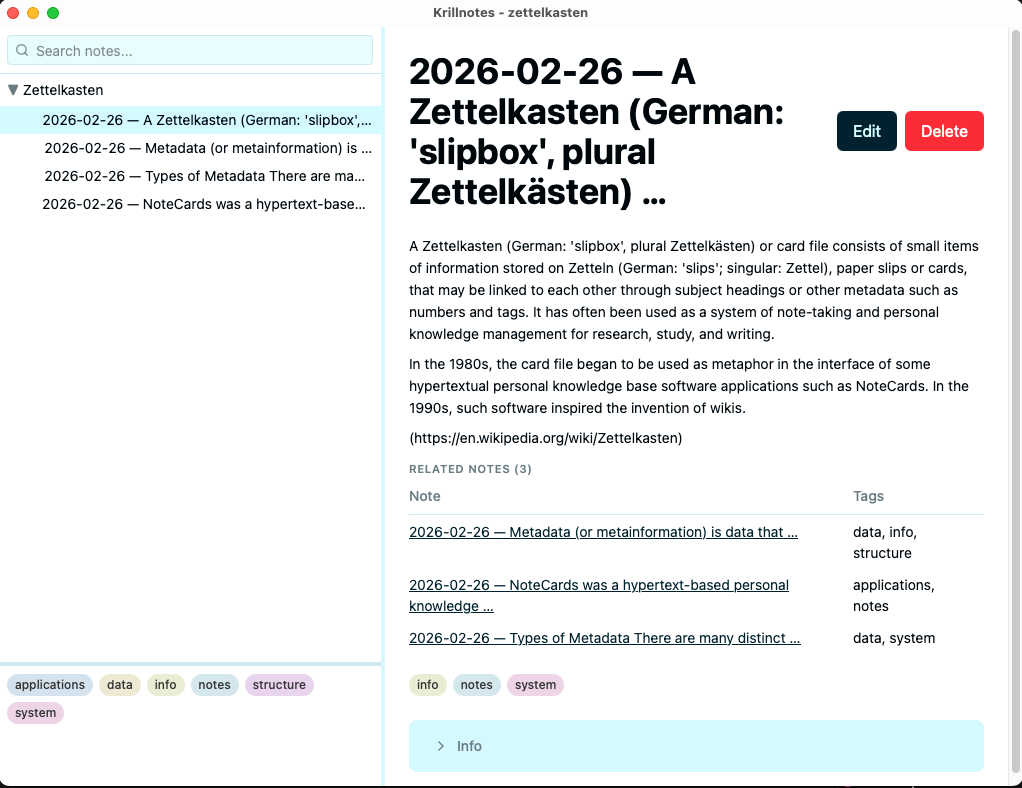
- Click any Zettel to see its body and a Related Notes table of notes sharing its tags
- Right-click the Kasten to sort all notes by date
How it works
Zettel schema — on_save hook
When you save a Zettel, the on_save hook builds the title automatically using
the built-in today() function and the first six words of the body:
on_save: |note| {
    let words = note.fields["body"].split(" ").filter(|w| w != "");
    let snippet = /* first 6 words, truncated with … if longer */;
    note.title = today() + " — " + snippet;
    note
}
The YYYY-MM-DD date prefix means titles sort chronologically as plain strings —
the tree sort actions need no special date parsing.
Zettel schema — on_view hook
When you click a Zettel note, the on_view hook:
- Renders the body text
- Reads
note.tags(the native tags assigned via the tag panel) - Calls
get_notes_for_tag(note.tags)to find all notes with any matching tag - Filters out the current note itself
- Displays a Related Notes table with title and tags columns
If the note has no tags, or no other notes share its tags, the related section is omitted.
Kasten schema — on_view hook
The Kasten overview shows a stats line (N Zettel · K unique tags) and a table of
the 10 most recent notes. “Most recent” is determined by sorting titles descending —
the YYYY-MM-DD prefix makes this correct without any date parsing.
Sort tree actions
Two add_tree_action entries on Kasten let you reorder the tree by date from the
right-click menu: Newest First (descending title sort) and Oldest First
(ascending title sort).